
Revolution Casino Login
Access your Revolution Casino account in under two minutes with email, phone, or one-click sign-in.
Games at Revolution Casino





Game Library




Getting into your Revolution Casino account takes under two minutes once you know which sign-in method you registered with. Log in with e-mail and password, or with phone number and an SMS code. If an attempt fails, the fixes below cover each cause, and live chat answers 24/7.
How to Log In: Step-by-Step
You can sign up at Revolution Casino in three ways: with email and a password, with a phone number and SMS code, or via one-click registration. Your login must correspond to the method you chose initially.
Launch the Revolution Casino website in your browser and click Log In.
Input the email address and password, or the phone number, associated with your account.
For phone-based accounts: enter the SMS verification code sent to your device.
For email accounts: open any confirmation message the casino sends and verify your login.
Let the lobby appear, then view your current balance.
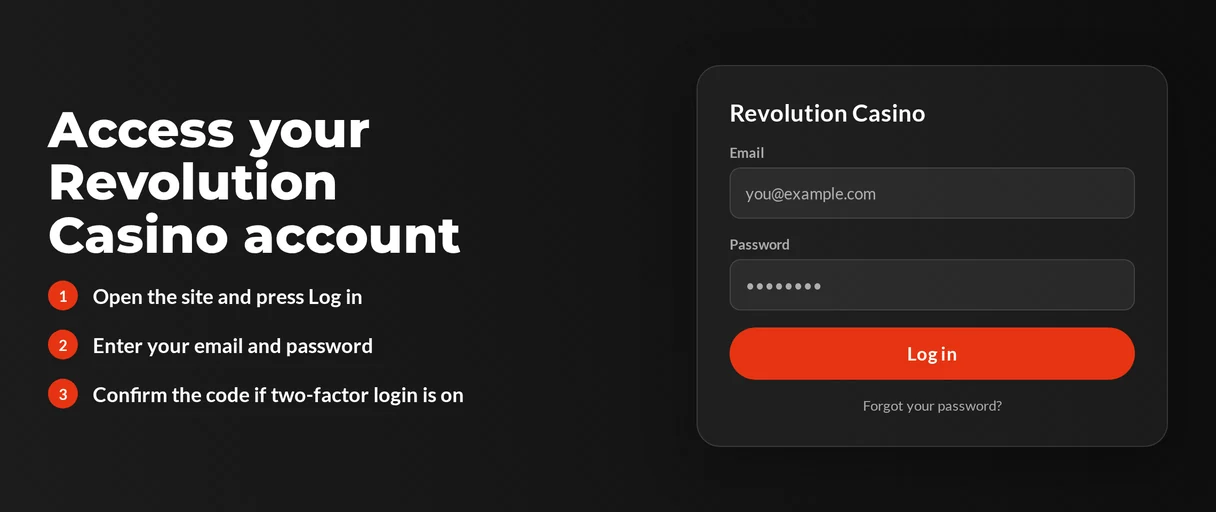
Two-factor authentication is not a standard feature. Login depends on your password and email confirmation, so no authenticator app is required. If you used one-click sign-up and lost your details, contact live chat for account recovery.
Login Problems and Fixes
Most login failures stem from one of these common issues. Identify your specific problem first, then apply the recommended solution.
| Problem | Likely Cause | Quick Fix |
|---|---|---|
| Wrong password message | Typing error or changed password | Reset your password (see below) |
| Account not found | Different registration method used | Try e-mail, phone number or one-click details in turn |
| Confirmation e-mail missing | Spam folder, wrong address or delay | Follow the e-mail fix below |
| Account locked | Self-exclusion or support action | Contact live chat |
| Withdrawal blocked | Documents not yet verified | Upload your documents |
| Page will not load or loops | VPN or proxy active | Switch the VPN off and retry |
| Login form freezes | Old cookies or cache | Clear cookies (steps below) |
When a confirmation email is missing, you take initial action and support assists if needed:
- Look in your spam or junk mail folders.
- Verify the email address on your account for accuracy.
- Wait a few minutes for delivery, then try requesting it once more.
- Reach out to live chat if the message still doesn't appear.
To delete browser cookies and cache:
- Go to your browser settings and locate the privacy or browsing data section.
- Choose cookies and cached files for Revolution Casino's site.
- Clear them, shut the browser, and then reopen it.
- Enter your normal login details to access your account.
How to Reset Your Password
Reset your own password at any time, and it will work right away. Provide the e-mail linked to your account.
- Click Log In and then pick the forgotten password choice.
- Type in the e-mail address you used when signing up.
- Check your inbox, even spam, for the casino's message and click the reset link inside.
- Create a fresh password that is unique to this site.
- Sign in using your new password.
Accounts with a phone number log in via SMS code. Contact live chat if you have trouble getting codes.
Account Locked or Suspended
Only support can unlock a locked account. Tell live chat your account's e-mail or phone number to speed things up.
| Reason | Who Acts | When |
|---|---|---|
| Self-exclusion request | Support closes the account | Aimed within 24 hours of your e-mail |
| VPN or proxy in use | You disconnect, then contact support if access stays blocked | Immediately |
| Documents outstanding | You upload, support reviews | Up to 3 business days after upload |
After support helps unlock your account:
- Go to the help centre and start a live chat.
- Provide the e-mail or phone number for your account.
- Respond to the agent's security questions.
- Do what the agent says and wait for them to confirm.
To self-exclude, you must e-mail the support team. Revolution Casino targets closing the account within 24 hours. This is why your login will no longer function, and resetting your password will not restore access. If gambling is harming you, contact the National Gambling Helpline at 1800 936 725 or go to gamblingcare.ie.
KYC Verification
Revolution Casino requires ID before your initial withdrawal. Submit it early, as verification may need up to 3 business days.
- Submit the ID documents they ask for.
- Support checks them, a process that can last up to 3 business days.
- You'll get confirmation, then you can submit your withdrawal request.
Payouts wait while verification is pending. If your account is restricted too, check with live chat if documents are the reason.
VPN Policy
Using a VPN or proxy violates Revolution Casino's terms. Turn it off before logging in, as an active VPN can create loading loops and access issues.
- Disable the VPN or proxy on your device.
- Close the browser, then open it again.
- Log in again.
- Get in touch with live chat if you still can't access your account.
Logging In via Mobile App
Revolution Casino doesn't have a dedicated iOS or Android app. You play via your mobile browser or an installable home-screen web app (PWA), and logging in works just like on desktop.
| Option | Available |
|---|---|
| iOS app (App Store) | No |
| Android app (Google Play) | No |
| Installable web app (PWA) | Yes |
| Biometric login | No |
| Push notifications | No |
To log in using the web app:
- Open Revolution Casino in your mobile browser.
- Add the site to your home screen from the browser menu.
- Tap the home-screen icon to launch it.
- Type in your email and password, or your phone number and SMS code.
Contact Support
Live chat is available 24/7 and is accessed through the help centre. Agents speak English, Finnish, Hungarian, Spanish, Polish, Portuguese, Italian, Czech, German, Slovenian, Greek, French, Norwegian and Arabic.
| Channel | Details | Best For |
|---|---|---|
| Live chat | 24/7 via the help centre | Locked accounts, missing e-mails, quick questions |
FAQ
To use Revolution Casino, you must be at least 18 years of age. If you find gambling no longer enjoyable, contact the National Gambling Helpline at 1800 936 725 or go to gamblingcare.ie.